Static Web Forms vs Conversational AI for Lead Capture: Which Converts Better and Why?
Sachin
In this article
Share Knowledge
A question that marketing directors and growth leaders frequently search for sums up the biggest debate in modern website conversion:
“What’s the difference between a static web form and a conversational AI agent for lead capture, and which tends to convert better?”
For over two decades, the “Contact Us” or “Request a Demo” web form has been the default tollbooth on company websites. You drive expensive paid traffic from Google Ads, LinkedIn, or SEO to a landing page, present an eight-field form wall, and pray the visitor fills it out before bouncing.
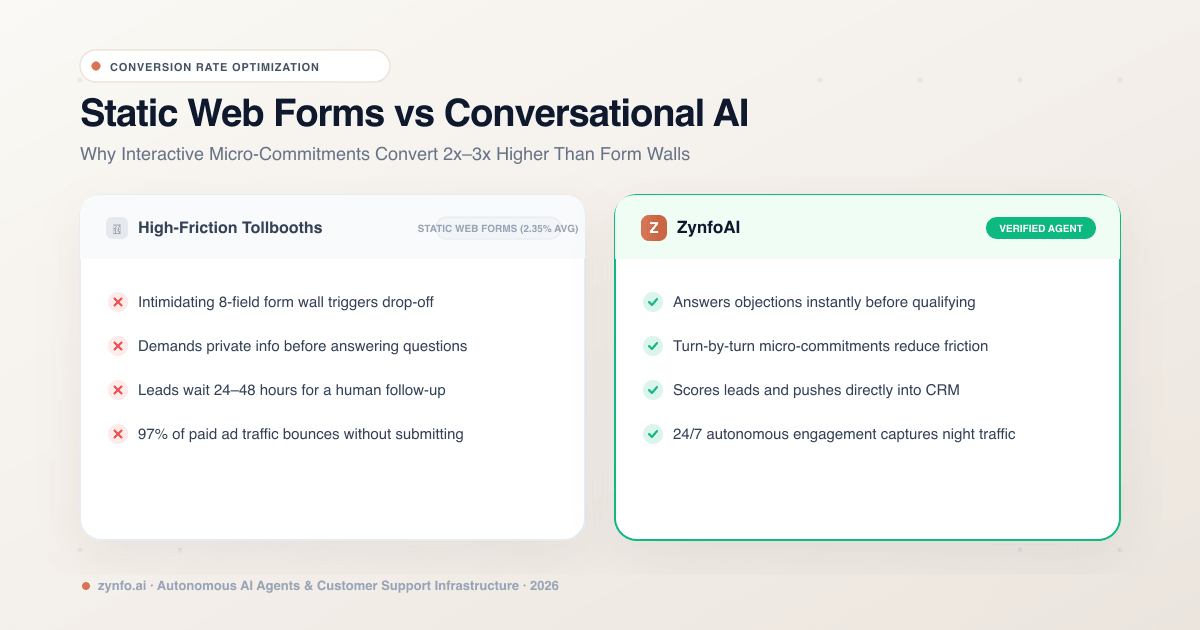
Yet industry conversion benchmarks reveal a harsh reality: standard B2B landing page forms average a meager 2.35% conversion rate, while the top 10% barely scratch 11%. Over 90% of your paid traffic leaves without leaving a single piece of contact info.
In this guide, we break down the fundamental differences between static web forms and conversational AI lead capture agents, examine the behavioral psychology behind why interactive chat dramatically outperforms static forms, and explain how to sync captured leads directly into your CRM.
Direct Comparison: Static Web Forms vs. Conversational AI Agents
To evaluate which model fits your business, consider how a high-intent prospect experiences both touchpoints:
| Feature | Zynfo AI | Static Web Forms |
|---|---|---|
| User Experience | Interactive turn-by-turn conversational dialogue | Monolithic block of 5–10 text fields |
| Time to Value | Value-first: answers questions before asking for email | Zero value upfront: demands data before answers |
| Cognitive Friction | Low friction: single micro-commitments in chat | High friction: intimidating form walls trigger drop-off |
| Response Time | Instant: qualified in under 2 seconds 24/7 | Delayed: 24–48 hours email response time |
| Lead Qualification | Dynamic scoring based on budget, intent, & urgency | Rigid checkboxes (often skipped or falsified) |
| CRM Integration | Native real-time sync into HubSpot, Zoho, & Freshsales | Manual CSV exports or fragile third-party glue |
| Drop-Off Recovery | Incremental capture: saves partial email for follow-up | Lost forever once the browser tab is closed |
Why Conversational AI Converts Significantly Better: The 3 Psychological Drivers
When growth teams replace or augment static forms with an autonomous lead capture chatbot, conversion rates frequently jump by 2x to 3x. This uplift is driven by three behavioral principles:
1. The Principle of Reciprocity
A static form demands information unilaterally: “Give us your name, email, phone number, company size, and budget before we show you our pricing or demo.”
In contrast, an AI agent gives value first. When a prospect asks, “Does your platform support Shopify inventory sync?” the AI immediately answers: “Yes, we sync directly with your live Shopify product catalog and orders.” Having received an instant, helpful answer, the visitor feels psychologically primed to provide their email address when the bot asks: “Would you like me to send you our setup guide and connect you with a specialist?“
2. Micro-Commitments vs. Cognitive Overload
Staring at a form with eight blank inputs creates immediate cognitive friction. Every extra field added to a web form reduces submission rates by roughly 4% to 10%.
Conversational AI breaks the qualification process into micro-commitments. The bot asks one simple question at a time:
- Step 1: “What is the main goal you are trying to automate today?” (User clicks an interactive option button)
- Step 2: “Great! What is your website URL?” (User types URL)
- Step 3: “Where should our team send your tailored preview?” (User enters email)
Because the user is already actively engaged, completing the interaction feels effortless.
3. Immediate Gratification
Modern buyers despise waiting. In B2B sales, responding to a lead within the first 5 minutes makes you 21 times more likely to qualify that lead than waiting 30 minutes.
A static form dumps the submission into an email inbox, forcing the lead to wait 24 to 48 hours for a sales rep to reach out. By that time, the buyer has already researched and contacted your competitor. An AI agent engages the lead at the peak of their buying intent.
Replace High-Drop-Off Forms with Conversational AI
Capture 2x more qualified leads 24/7. Turn anonymous website visitors into enriched CRM contacts automatically.
Can AI Chatbots Identify Hot Leads?
A common fear among sales teams is that chatbots will flood their CRM with unqualified tire-kickers or spam submissions.
Modern AI agents use structured intent scoring to differentiate casual browsers from high-value enterprise buyers:
- Rule-Based Scoring: Assigns lead scores based on the visitor’s self-reported requirements (e.g., enterprise seats, monthly conversation volume, budget timeline).
- Intent Recognition: Evaluates conversation keywords—such as “custom contract”, “migration from Zendesk”, or “annual billing”—to flag high-intent accounts.
- Lead Status Tagging: Automatically categorizes contacts in your dashboard as New, Contacted, Qualified, Converted, or Lost.
When a hot lead is detected during business hours, the AI can immediately trigger a human handoff to bring a live sales rep into the chat before the prospect leaves your site.
How to Integrate Forms and Chatbots to Capture Website Leads
You don’t necessarily have to delete all static web forms from your website overnight. In fact, the highest-converting digital strategies use a hybrid integration model:
- High-Intent Pages (
/pricing) — Pair Form with AI Safety Net: Keep a clean 2-field form above the fold, while the AI floats in the corner to catch visitors with lingering pre-sale questions who would otherwise bounce. - Content & Blog Posts — In-Flow Discovery: Static forms convert at under 0.8% on blog posts. The AI chatbot offers contextual templates and answers technical doubts, capturing leads directly in the reading flow.
- After-Hours (Nights & Weekends) — Autonomous AI SDR: While sales reps are offline, the AI answers pricing questions, qualifies company requirements, and books follow-up meetings directly.
Connecting Lead Capture Directly with CRM Systems
Manual data entry is where marketing pipelines break down. When a lead is captured via an in-chat form (name, email, phone number, company name, custom notes), it must enter your sales pipeline instantly.
Platforms like ZynfoAI provide native CRM connectors:
- HubSpot: Automatically creates or updates the Contact, maps custom property fields, and creates an associated Deal in your sales pipeline.
- Zoho CRM: Syncs leads directly into your Zoho Leads or Contacts module with lead score and source attribution.
- Freshsales: Ingests new accounts and leads complete with conversational transcripts for sales rep context.
Your sales reps open their CRM in the morning and see fully enriched leads with complete conversation transcripts attached—zero manual copy-pasting required.
Conclusion: Conversational AI Wins the Conversion Race
Static web forms aren’t completely dead, but relying on them as your sole lead generation mechanism is leaking revenue.
Modern buyers expect instant, interactive answers. By deploying a conversational AI agent that educates visitors, answers objections in real time, and captures structured lead fields directly into your CRM, your website transforms from a static digital brochure into an active, 24/7 revenue-generating engine.
Ready to see how conversational lead capture transforms your conversion rates? Sign up to ZynfoAI free today and launch your AI lead capture agent in minutes.
Related Keywords & Expertise
Recommended Resources & Tools
Put this into practice with our free tools & solutions
Chatbots vs Static Forms
Replace boring contact forms with conversational AI flows that convert 3x higher.
Chatbot ROI Calculator
Calculate your projected cost savings, ticket deflection rate, and revenue impact.
Free Schema Markup Generator
Create valid JSON-LD structured data for Google rich snippets in seconds.
Shared Team Inbox
Manage website chat, WhatsApp, and email conversations from a unified workspace.
You Might Also Like
How AI Agents Are Transforming E-commerce
Discover how autonomous ecommerce AI agents transform retail. Learn high-impact use cases, customer support automation, and growth strategies.

AI Automation Agency & AI Receptionist in Qatar (2026 Guide) | ZynfoAI
Looking for an AI automation agency in Qatar? Discover how Qatari businesses deploy 24/7 AI receptionists, Arabic chatbots, and customer support automation in Doha.

Best AI Chatbot for Ecommerce (2026 Guide) | ZynfoAI
Discover the best AI chatbot for e-commerce. Automate order tracking, reduce cart abandonment, and increase AOV by 23% with ZynfoAI's 24/7 retail AI agent.
Want to learn more?
Explore our entire library of insights on AI automation, lead generation, and scaling customer support.
Read blogs nowAutomate your support with AI
Deploy an AI agent in 2 minutes. Deflect 70%+ of customer tickets.