Shopify 16 min read
Yuma AI Alternatives for Small Shopify Stores
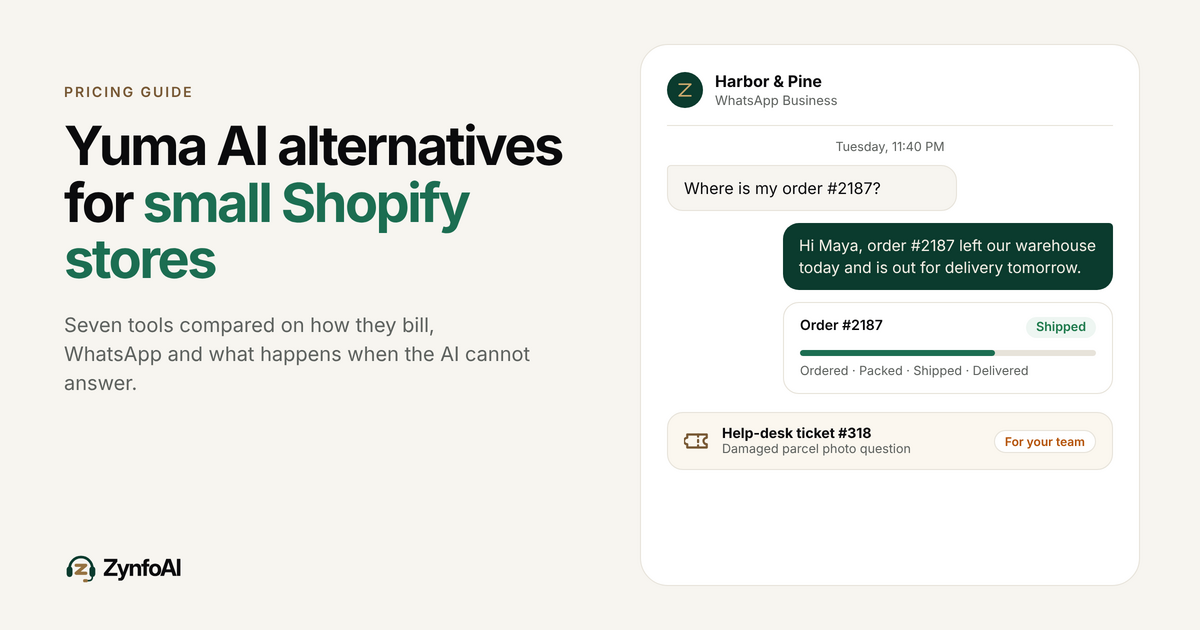
The best Yuma AI alternative for a small Shopify store is the tool whose price you can read today and predict in your busiest week. Yuma publishes no price on its pricing page, so you cannot compare it with anything until you book a demo. This guide compares seven tools, Yuma included, on how each one bills, whether it lists WhatsApp and what happens when the AI cannot answer. Every figure comes from the vendor’s own pricing page, read on 27 October 2026.
Last updated: 27 October 2026.
ZynfoAI is an AI customer service agent for Shopify stores that answers customers on WhatsApp Business and website chat. ZynfoAI Starter costs $39 a month, or $390 a year, with 1,000 AI replies a month and 3 team seats, no per-resolution or per-seat fees, and a 7-day free trial with no card.
This guide is for a Shopify owner in the US, UK, Canada, Australia or the UAE who answers customers alone or with one to three people, and who is planning support before Black Friday on 27 November 2026. ZynfoAI is our product, so it is one row in the comparison with a plain “not for” next to it. Where a vendor’s page says nothing about a point, we write “not stated” and you should ask the vendor.
What are the best Yuma AI alternatives for a small Shopify store?
Six tools are worth a look next to Yuma: Richpanel, eDesk, Gorgias, Fin, Zipchat and ZynfoAI. Yuma suits brands that want to pay only for tickets it fully resolves and are happy to start with a demo. The others suit stores that want a published price, a helpdesk around the AI, or one flat bill. Your choice follows how you want to be billed.
| Tool | Best for | Not for | Channels | Pricing model | Human handoff |
|---|---|---|---|---|---|
| Yuma | Brands that want to pay only for tickets the AI fully resolves | Owners who want a published price before a demo | WhatsApp and Shopify not named on the pricing page | Outcome-based; no dollar amount published; plan sized in a demo; 30-day free trial on real ticket data | Escalations are not charged; how handoff works is not described |
| Richpanel | Teams that want a helpdesk with WhatsApp and AI credits | Solo owners who want a low monthly floor | Email, chat, social, SMS and WhatsApp; Shopify not named on the pricing page | $99 per seat a month on annual billing ($119 monthly); AI about $0.20 per conversation, with a $200 monthly AI minimum | AI agents follow your rules, with human handoff |
| eDesk | Sellers who run a store and marketplaces from one inbox | Stores that need WhatsApp pricing spelled out | Email, live chat, social; WhatsApp and Shopify listed as integrations | Essential $39, Growth $89, Professional $119 per agent a month on annual billing; AI Agent $0.99 per outcome | Not described on the page |
| Gorgias | Shopify stores that want a full helpdesk with AI on top | Stores that want one flat bill | Email, live chat, SMS, voice, social, contact form, TikTok Shop; WhatsApp not listed | Helpdesk plans by ticket volume (Basic $50 a month on annual billing for 300 tickets); AI Agent $0.90 per automated interaction on annual contracts, $1.00 on monthly | Not described on the page |
| Fin | Teams that want to pay only per outcome and keep their helpdesk | Stores that cannot predict volume | Live chat, email, SMS, WhatsApp and social | $0.99 per outcome, 50-outcome monthly minimum on another helpdesk | A handoff through a Procedure counts as a billable outcome |
| Zipchat | Shopify stores that want an AI agent sold by reply bundles | Stores that want a single low-cost plan above 750 replies | Website chat, WhatsApp, Instagram, Messenger, email | Starter $64 a month on annual billing for 750 replies; extra packs of 250 replies for $49 | Not described on the page |
| ZynfoAI | Small Shopify teams that want flat pricing on website chat and WhatsApp | Large enterprises that need a full ticketing suite | Website chat, WhatsApp Business, Shopify | Starter $39 a month: 1,000 AI replies, 3 seats, no per-resolution fees | Questions the AI agent cannot answer become help-desk tickets; live chat handoff is on the Pro plan |
Every price above is the vendor’s published list price on 27 October 2026. Taxes, discounts and annual terms can change them. For one-to-one comparisons, see all ZynfoAI alternatives.
Why do small Shopify stores look for a Yuma alternative?
Small stores usually look past Yuma for one reason: they cannot work out a monthly bill from the pricing page. Yuma’s page says you “pay only when Yuma fully resolves a ticket”, but it lists no rate, no plan names and no minimum. The right plan is sized in a demo and qualification step.
That model has real strengths. A brand with a large ticket history and a support lead who wants a controlled rollout gets a trial on real tickets: Yuma offers a free 30-day trial and starts with an agreed success target on a share of eligible conversations. It is a sound way to buy for a team of ten.
A store of one to three people asks a simpler question: “what will I pay in November?” The tools below answer it from the page. Two of them, Gorgias and Fin, we have covered in their own guides. For the larger helpdesk, see our Zendesk alternatives guide.
How much does each alternative cost in a normal month and a sale month?
For a made-up store with 1,200 orders a month and two people on support, per-outcome tools cost about $297 to $672 in a month, and the same chats cost $39 on ZynfoAI Starter in a normal month and $99 on the Pro plan in a sale month. The gap comes from the billing unit, not from quality. The arithmetic is below, so you can swap in your own numbers.
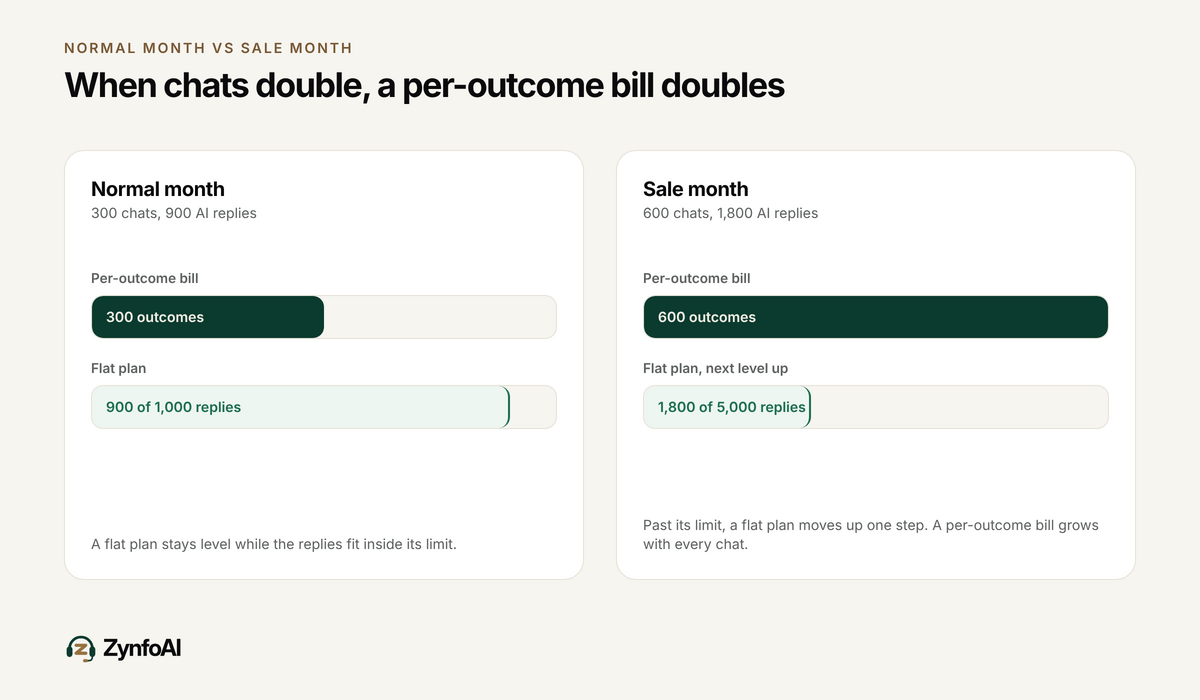
Meet Harbor & Pine, an invented home-goods store with 1,200 orders a month and two people on support. We use the same assumptions as our guide on how many AI replies a Shopify store needs: one order in four leads to a chat, and the AI agent sends about three replies in each chat. That gives 300 chats and 900 AI replies in a normal month. Black Friday doubles it to 600 chats and 1,800 replies. To keep the comparison simple, we assume the AI agent settles every chat. That is a ceiling, because some chats will go to a person.
| Tool | How the bill is built | Normal month: 300 chats | Sale month: 600 chats |
|---|---|---|---|
| Yuma | Outcome-based, no published rate | Not published | Not published |
| Richpanel | 2 seats at $99 annual, AI at about $0.20 per conversation with a $200 monthly minimum | $398: $198 plus the $200 minimum ($60 of usage) | $398: $198 plus the $200 minimum ($120 of usage) |
| eDesk | 2 Essential agents at $39 annual, plus $0.99 per outcome | $375: $78 plus $297 | $672: $78 plus $594 |
| Gorgias | AI Agent at $0.90 per interaction on annual, on top of a helpdesk plan | $270 for AI, plus a plan from $50 | $540 for AI, plus a plan |
| Fin | $0.99 per outcome, on your current helpdesk | $297 at the ceiling | $594 at the ceiling |
| Zipchat | Starter 750 replies at $64, packs of 250 at $49; Pro $240 for 3,000 replies | $113: Starter plus one pack | $240: Pro, cheaper than Starter plus five packs ($309) |
| ZynfoAI | Starter: 1,000 replies; Pro: 5,000 replies | $39, because 900 replies fit inside 1,000 | $99, the Pro plan, because 1,800 replies pass Starter’s 1,000 |
Four cautions. First, the units differ: an “outcome”, a “conversation”, an “interaction” and a “reply” are not the same thing, so this table shows scale, not a quote. Second, Richpanel’s minimum means its bill barely moves between the two months, which is a point in its favour for budgeting. Third, Gorgias plans include a ticket allowance and a few AI interactions, so the real total sits between the AI line and the AI line plus a plan. Fourth, ZynfoAI Starter has 1,000 replies a month, so a store above that moves to the Pro plan at $99, which has 5,000 AI replies a month and also includes live chat handoff to your team.
WhatsApp message fees are separate on every tool. Meta’s WhatsApp pricing page says businesses are charged per delivered message, that Meta does not charge for messages from users to businesses, and that each business phone number gets 1,000 free service messages a month, with charges starting at the 1,001st. ZynfoAI adds no per-resolution or per-seat fees on top of Meta’s charges.
Which pricing model is easiest to predict before Black Friday?
A flat plan is the easiest to predict. A per-outcome price is the easiest to start and the hardest to budget, because every extra chat adds cost on the day it arrives. Per-seat helpdesks with an AI minimum sit in the middle: part of the bill is fixed, and the AI usage above the minimum is metered.
Think of the models this way:
- Per outcome or interaction (Fin, eDesk, Gorgias AI Agent, Yuma). You pay when the AI settles a conversation. A busy week means a bigger bill.
- Seats plus an AI minimum (Richpanel). You pay for seats and a monthly AI floor, then top up in blocks.
- Reply bundles (Zipchat). You pay for a block of AI replies and buy packs when you run out.
- Flat plan (ZynfoAI). You pay one monthly price for a set number of AI replies. When you reach the limit, you move up a plan.
Our flat-rate versus per-resolution guide explains why the same chat can add nothing on one model and a dollar on another. The 6-week Black Friday support plan for Shopify turns this into a calendar.
What should an AI agent do with Shopify orders?
An AI agent for a Shopify store should read the live order and answer in plain words, not quote a policy page. That means status, shipping progress and what to expect next. Anything it cannot settle should reach a person with the chat attached, not vanish into a loop.
Shopify already gives shoppers an order status page where “customers can return to this page to check the status of their shipment without contacting you directly” (Shopify Help Center, order status page). Many shoppers still message instead, because the link is buried in an email. An AI agent answers that message on the channel the shopper chose.
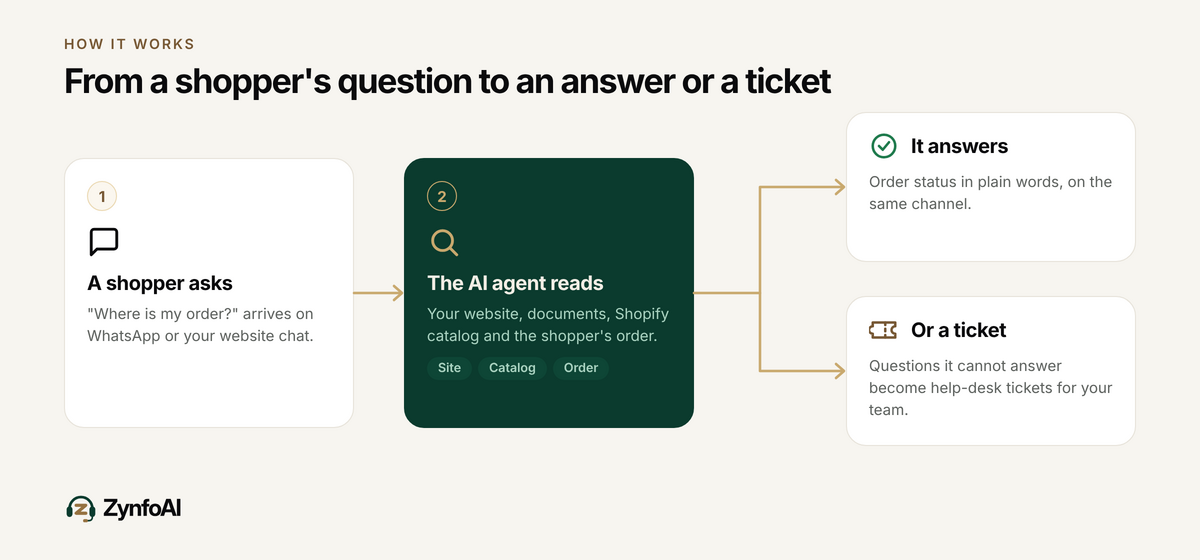
ZynfoAI connects to Shopify and learns from the store’s website, documents and catalog. It checks order status, helps shoppers find products and captures leads. Details are on the order tracking page and the Shopify integration page. For a longer list of questions to put to any vendor, read how to evaluate Shopify AI customer support.
What happens when the AI agent cannot answer?
Ask every vendor this before you pay. A good answer has three parts: the AI says it does not know, the shopper still gets a route to a person, and your team sees the whole chat. The worst outcome is a shopper stuck in a loop.
Vendors differ on how they say it. Yuma does not charge for escalations, though its page does not describe how handoff works. Richpanel says its AI agents follow your rules, with human handoff. Fin counts a handoff through a Procedure as a billable outcome, while conversations passed to your team without an outcome are not charged. The eDesk, Gorgias and Zipchat pricing pages do not describe handoff.
On ZynfoAI Starter, a question the AI agent cannot answer becomes a help-desk ticket for your team. Starter has no live chat handoff. Live chat handoff to your team is on the Pro plan. Our guide on what happens when an AI agent cannot answer shows the ticket flow step by step.
Which Yuma alternative fits which store?
Match the tool to the store you actually run. A solo owner who sells on WhatsApp has different needs from a team of six that lives in a helpdesk. Use the “best for” and “not for” columns above, then check this short list.
- You want to pay only for fully resolved tickets and are happy to start with a demo. Stay with Yuma, and ask for a written rate before the trial ends.
- You want a helpdesk with WhatsApp and a fixed AI floor. Look at Richpanel.
- You sell on a store and on marketplaces. Look at eDesk.
- You want a full Shopify helpdesk with AI on top. Look at Gorgias.
- You already run a helpdesk and want to add an AI agent. Look at Fin.
- You want an AI agent sold in reply bundles. Look at Zipchat.
- You want one flat price on website chat and WhatsApp, with order tracking. Look at ZynfoAI Starter. It is not for large enterprises that need a full ticketing suite.
How do you test an alternative before switching?
Run a one-week test with real questions, not a demo script. Keep your current tool running, so no customer is left without support while you compare. Most of these vendors offer a trial, and ZynfoAI gives 7 days with every Pro feature on and no card.
- Collect 20 real questions. Pull them from your last month of tickets: order status, shipping delays, product questions, store policies.
- Add your store. Connect Shopify and point the tool at your website and policy documents.
- Ask the 20 questions. Mark each answer right, wrong or “should have gone to a person”.
- Test the handoff. Ask something the tool should not answer. See who gets it and what they see.
- Count your replies. Note how many AI replies a typical day uses, then multiply by 30.
- Price your peak. Double the number for a sale month and check each vendor’s price at that volume.
- Pick, then switch the channel last. Move WhatsApp or the chat widget only after the test passes.
ZynfoAI’s Starter plan is bought on zynfo.ai; inside the ZynfoAI Shopify app, only the Pro plan is on sale today. After the trial, your workspace moves to the Free plan with 100 AI replies a month unless you choose a plan, and your data is kept. There is a 15-day money-back guarantee on Starter and Pro.
Checklist before you choose
- The price page shows a rate you can multiply, not “contact us”.
- The page states what counts as a billable unit: seat, outcome, conversation, reply or interaction.
- You worked out the bill for a normal month and a sale month.
- WhatsApp is listed as a channel, and you know who pays Meta’s message fees.
- The AI agent reads live Shopify orders.
- There is a clear route to a person, and you know which plan includes it.
- The vendor says what happens when you pass the plan limit.
- You tested 20 real questions, including 3 the AI should not answer.
FAQ
What is the best Yuma AI alternative for a small Shopify store?
There is no single winner. Pick by billing style. Richpanel has a fixed AI floor, eDesk and Fin charge $0.99 per outcome, Zipchat sells reply bundles, and ZynfoAI Starter is $39 a month flat with 1,000 AI replies. Test each one with 20 real store questions before you commit.
How much does Yuma AI cost?
Yuma’s pricing page lists no dollar amount. It says you pay only when Yuma fully resolves a ticket and that the plan is estimated in a demo and qualification step. It offers a free 30-day trial on real ticket data. Ask Yuma for a written rate, as of 27 October 2026.
Is there a Yuma alternative with flat pricing?
Yes. ZynfoAI Starter costs $39 a month, or $390 a year, with 1,000 AI replies and 3 team seats and no per-resolution or per-seat fees. If a store passes 1,000 replies a month, the Pro plan has 5,000 AI replies for $99 a month.
Does an AI agent for Shopify work on WhatsApp?
Some do. Richpanel, Fin and Zipchat list WhatsApp on their pages, and eDesk lists it as an integration. Yuma’s pricing page does not name it. ZynfoAI answers customers on WhatsApp Business and website chat from one AI agent. Meta bills WhatsApp message fees separately, whichever tool you use.
What happens when the AI agent cannot answer a shopper?
It depends on the tool. On ZynfoAI Starter, the question becomes a help-desk ticket for your team. Live chat handoff to your team is on the Pro plan. Ask any vendor whether the shopper reaches a person, whether your team sees the chat, and whether the handoff is billed.
Can I try ZynfoAI before paying?
Yes. Every new workspace gets a 7-day free trial with every Pro feature on, no credit card, and nothing charged automatically. After the trial the workspace moves to the Free plan with 100 AI replies a month unless you choose a plan. Your data is kept, and you can cancel anytime.
Tools and guides
Put this into practice
AI Chatbot for E-commerce
Recover abandoned carts, automate order tracking, and boost online store sales.
Free ToolChatbot ROI Calculator
Calculate your projected cost savings, ticket deflection rate, and revenue impact.
Free ToolAI WhatsApp Reply Generator
Generate high-converting, professional WhatsApp sales and support replies with AI.
FeatureAI with Human Handoff
Escalate complex chats to live agents with complete conversation context.