Shopify 13 min read
What Happens When an AI Agent Can't Answer?
Last updated: 23 October 2026.
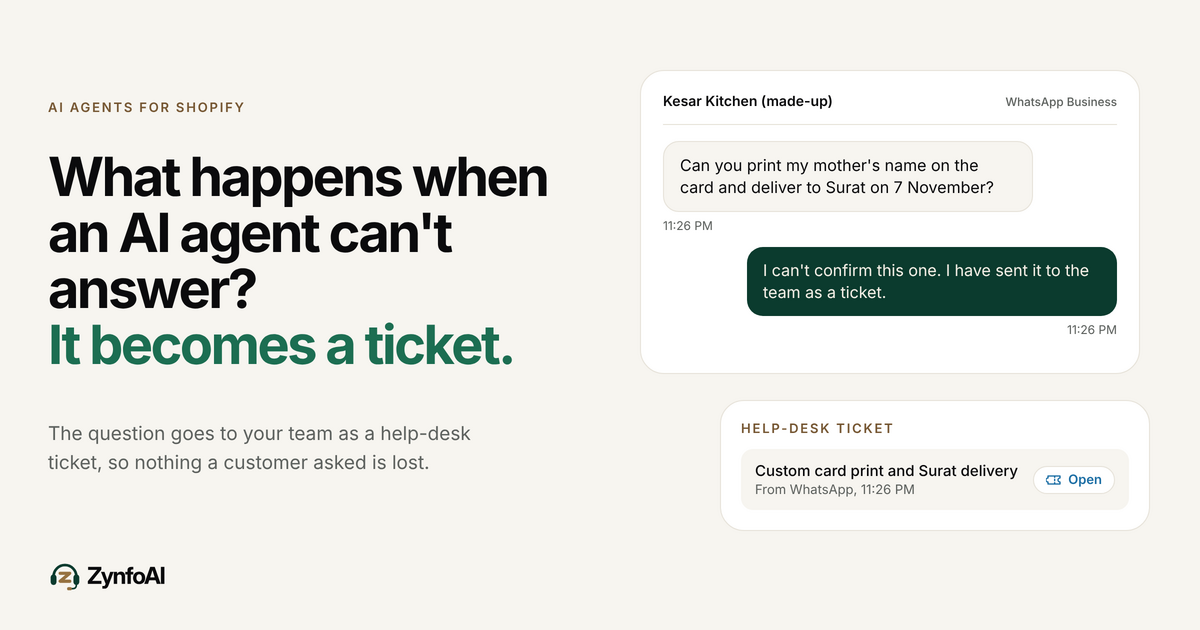
What happens when an AI agent can’t answer a customer question depends on how it was built. A weak one guesses, and the customer gets a confident wrong answer. A better one says it does not know and stops. ZynfoAI takes a third path: the question becomes a help-desk ticket for your team, so nothing a customer asked disappears.
ZynfoAI is an AI customer service agent for Shopify stores that answers customers on WhatsApp Business and website chat. It costs from $39 a month, with no per-resolution or per-seat fees, and a 7-day free trial with no card.
This guide is for the owner of an Indian D2C store on Shopify who supports customers on WhatsApp and is wondering what an AI agent does with the questions it has no answer for. It covers why those questions are unavoidable, the four things an agent can do with one, a worked example, and a test you can run before you pay. The store in the example, Kesar Kitchen, is made up, and its numbers are assumptions you should replace with your own.
Why will an AI agent always meet questions it can’t answer?
Because an AI agent only knows what you give it. ZynfoAI learns from your website, your documents and your Shopify catalog, up to 50 knowledge sources. A customer will always ask something outside those: a custom request, a courier dispute, a one-off change to an order. Every store has these questions, and no tool removes them.
On an Indian D2C store the list is easy to recognise. A shopper wants a printed card with a gift hamper. A buyer who chose cash on delivery asks if they can switch to UPI after ordering. A customer says the courier marked the parcel delivered but nothing arrived. None of these has a single answer in a product page, and each needs a person who can decide.
So the useful question is not “can the AI agent answer everything?” It cannot. The useful question is what it does at the moment it reaches the edge of what it knows. That moment decides whether the customer feels looked after or ignored.
What can an AI agent do with a question it can’t answer?
It can do four things: guess, admit it does not know and stop, send the customer to a phone number or form, or record the question for your team as a ticket. The first three leave a gap. The fourth keeps the question alive until a person answers it.
| What the agent does | What the customer sees | Best for | Not for |
|---|---|---|---|
| Guesses an answer | A confident reply that may be wrong | Nobody. A wrong delivery date or price creates a second problem | Any store that cares about refunds and trust |
| Says “I don’t know” and stops | A dead end | Very low-volume stores where the owner watches every chat | Stores that get messages at night or on festival days |
| Points to a phone number or form | A task for the customer, often skipped | Stores with staffed phone lines | Customers who chose WhatsApp because they do not want to call |
| Creates a help-desk ticket for the team | A reply that the question is with your team | Small Shopify teams with 1 to 6 people on support | Stores that need a live person on the chat within seconds |
The last row is the honest trade. A ticket is not an instant human answer. It is a record that a person will pick up, which beats a guess or a dead end, and it costs the customer nothing to wait for.
What does ZynfoAI do when it can’t answer?
ZynfoAI turns a question it cannot answer into a help-desk ticket for your team. It does this on WhatsApp Business and on website chat, because one AI agent serves both. The Starter plan opens a ticket. It does not transfer the live chat to a person, so plan for a reply after your team reads the ticket. Live chat handoff is on the Pro plan.
That makes the ticket list the working surface for your team. Anything the AI agent answered stays answered. Anything it could not answer is waiting in one place, so your team can work through it. You do not have to read every chat to find the hard ones.
For stores comparing tools, this is the question to ask any vendor: “Show me what a customer sees and what my team sees when the agent does not know.” Ask it on a real question from your own chats, not on the vendor’s demo.
What does this look like for a Jaipur food store on a festive night?
Kesar Kitchen is a made-up store in Jaipur that sells pickles, spice blends and gift hampers. Assume 700 orders a month, two people on support, and a Diwali rush in the first week of November. At 11:20 PM a customer writes on WhatsApp. The AI agent handles four messages and passes one on.
Here is the night, message by message. All of it is invented for the example.
| Time | Customer asks | Where the answer comes from | Result |
|---|---|---|---|
| 11:20 PM | ”Where is my order #2087?” | The Shopify order | Answered by the AI agent |
| 11:22 PM | ”Do you have a gift hamper under Rs 1,500?” | The Shopify catalog | Answered, with product suggestions |
| 11:24 PM | ”What is your return policy for sealed jars?” | A policy page on the website | Answered by the AI agent |
| 11:26 PM | ”Can you print my mother’s name on the card and deliver to Surat on 7 November?” | Nowhere. It needs a decision | A help-desk ticket for the team |
Three of four are answered at once. The fourth is not lost. In the morning the owner opens the ticket list, sees a custom-print and date question, checks the packing schedule and replies. Without a ticket, the same message would sit in a WhatsApp thread among hundreds of others.
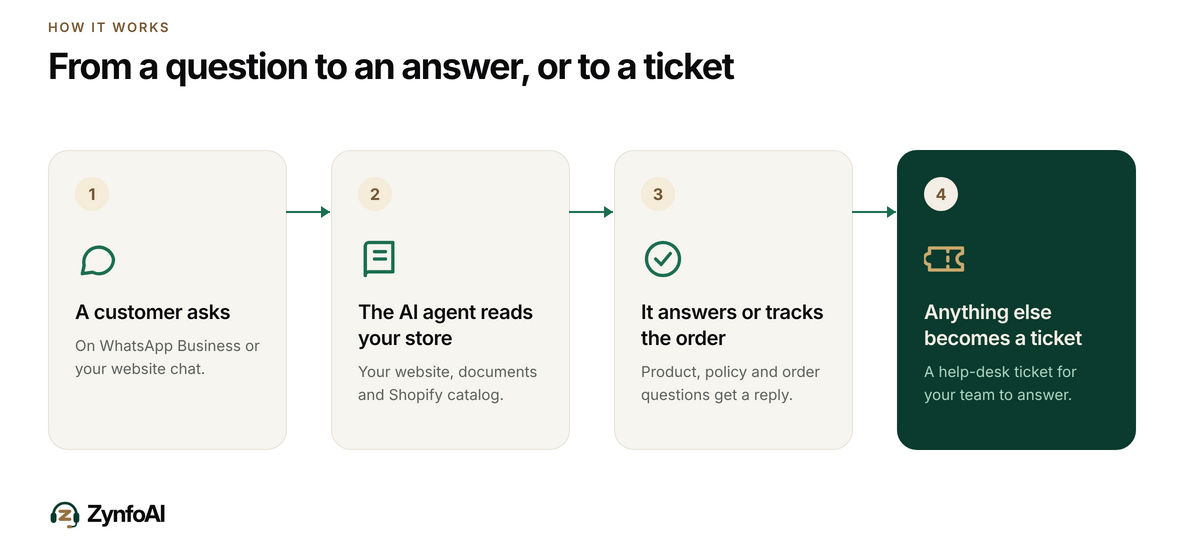
The same flow works on your website chat. If you want the order-status half of the picture, the order tracking feature shows how the AI agent reads an order, and the post on reducing “where is my order” tickets on Shopify covers the repeat question that fills most inboxes.
How do you know an AI agent won’t invent an answer?
You test it before you trust it. Ask the agent ten questions whose answers are not in your site, documents or catalog, and read every reply. A good agent says it does not know and creates a ticket. A weak one produces a plausible answer. Run this test in your free trial, using questions from your real chats.
A simple version of the test:
- Pull ten real questions from last month’s WhatsApp chats that needed a person.
- Ask each one in the trial exactly as the customer wrote it.
- Mark each reply: asked for a ticket, said it did not know, or made something up.
- Do it again after you add your shipping and returns pages as knowledge sources.
If even one reply invents a delivery date, a price or a policy, do not switch the agent on for customers until you understand why. The post on how AI agents learn from business data without making things up goes through the causes. Gaps in your documents are the most common.
How do you stop the same question becoming a ticket every day?
Read the tickets, answer the person, then put the answer where the agent can learn it. Each repeat question you add to your site or a document is one fewer ticket next week. The ticket list is a to-do list for your knowledge, not only for your team.
Use this loop every morning:
- Open the ticket list. Sort by how long each has waited.
- Reply to the customer. Use the channel they wrote on.
- Mark the pattern. If two tickets in a week ask the same thing, it is not a one-off.
- Write the answer once. Add it to a page on your site, such as shipping, returns or custom orders, or to a document.
- Add the source. ZynfoAI Starter allows up to 50 knowledge sources, so make sure the new page is one of them.
- Test it. Ask the agent the question the way a customer would.
Some questions will never become answers. Custom printing, bulk gift orders and courier disputes need judgement each time. Leave those as tickets, which is where they belong.
What does this cost, and when is it not the right tool?
ZynfoAI costs from $39 a month on Starter, with 1,000 AI replies and 3 team seats. There are no per-resolution or per-seat fees. WhatsApp message fees are billed by Meta. The tagline holds here: “Support that scales. Your bill doesn’t.” The 1,000-reply allowance is the limit to watch.
Suppose Kesar Kitchen has 20 support conversations a day in festive week and each takes three AI replies (both assumptions). That is 60 replies a day, about 420 in a week, which leaves room in the month for normal days. A store with several times that volume would pass 1,000 replies and should check its own numbers on the pricing page before it commits.
Meta’s own pricing page says it gives 1,000 free service messages per month for each business phone number, and that the customer service window opens for 24 hours each time a customer writes (Meta pricing for the WhatsApp Business Platform). A morning reply to a night message is usually still inside that window. For the full picture of WhatsApp costs in 2026, read WhatsApp Business API pricing in 2026.
ZynfoAI Starter is not the right tool for a large team that needs a full ticketing suite with many agents, or for a store that needs every hard question handed to a person on the live chat within seconds. It is built for small Shopify teams that want one flat price and a clear list of what needs them.
Does order tracking solve most of the problem?
For online stores it solves the biggest piece. “Where is my order?” is the most repeated question, and it is answerable from the order itself. Shopify’s own help page says a customer who has not logged in sees limited details and no tracking number once the access window ends (Shopify Help Center: About order status pages).
That gap is why customers ask on WhatsApp instead. When the AI agent reads the order and replies, those messages never become tickets, and your team’s list holds only the questions that need a person. The WhatsApp order tracking for Shopify guide explains how this works in practice.
If you still answer by hand in the WhatsApp Business app, the app’s quick replies let you store up to 50 saved messages and call them with a ”/” shortcut (WhatsApp Help Center: quick replies). That helps with typing speed, not with the night messages that arrive while you sleep. The post on WhatsApp support after office hours covers that side. For the difference between a chatbot that follows a script and an AI agent that learns your store, see AI agent vs chatbot.
What should you check before you pick an AI agent for your store?
Check four things: what it learns from, what it does with an unknown question, what it costs when it works well, and what your team sees. The answers decide whether the agent saves your evenings or adds a new inbox to watch. The guide to evaluating Shopify AI customer support expands each one.
- Source of answers: Does it learn from your site, documents and Shopify catalog, and can you see what it learned?
- Unknown questions: Does it guess, stop, or create a ticket? Test with ten real questions.
- Pricing when it works: Is there a fee per resolution? A flat plan means success does not raise the bill.
- Team view: Where does your team see the hard questions, and how many seats are included?
FAQ
What happens when an AI agent can’t answer a question?
It depends on the product. Some guess, some stop, and some pass the question to a person. ZynfoAI turns a question it cannot answer into a help-desk ticket for your team, so the question is recorded and a person replies. On the Starter plan this is a ticket, not a live transfer of the chat.
Does ZynfoAI make up answers?
ZynfoAI answers from your website, documents and Shopify catalog. Gaps in those sources are the usual cause of wrong answers in any AI agent, so test it before you switch it on. Ask ten questions whose answers are not in your sources, and check that it does not invent one.
Does the AI agent create a ticket on WhatsApp too?
Yes. One ZynfoAI agent answers on WhatsApp Business through the official API and on your website chat. A question it cannot answer on either channel becomes a help-desk ticket for your team.
How do I reduce the number of tickets?
Answer the customer, then add the answer to your website or a document and include it as a knowledge source. Starter allows up to 50 sources. Questions that need judgement, such as custom orders or courier disputes, will stay as tickets, and that is the correct outcome.
How much does ZynfoAI cost?
ZynfoAI costs from $39 a month on Starter. It includes 1,000 AI replies a month and 3 team seats, with no per-resolution or per-seat fees. WhatsApp message fees are billed by Meta. There is a 7-day free trial with no card, and a 15-day money-back guarantee.
Is an AI agent the same as a chatbot?
No. A scripted chatbot follows a fixed flow. An AI agent learns your own website and catalog, tracks orders, captures leads and turns questions it cannot answer into help-desk tickets for your team. People search for “chatbot”, so you will see both words used for the same kind of tool.
Tools and guides
Put this into practice
AI Chatbot for E-commerce
Recover abandoned carts, automate order tracking, and boost online store sales.
Free ToolChatbot ROI Calculator
Calculate your projected cost savings, ticket deflection rate, and revenue impact.
Free ToolAI WhatsApp Reply Generator
Generate high-converting, professional WhatsApp sales and support replies with AI.
FeatureAI with Human Handoff
Escalate complex chats to live agents with complete conversation context.