Shopify 16 min read
How Many AI Replies Does a Shopify Store Need?
Last updated: 23 October 2026.
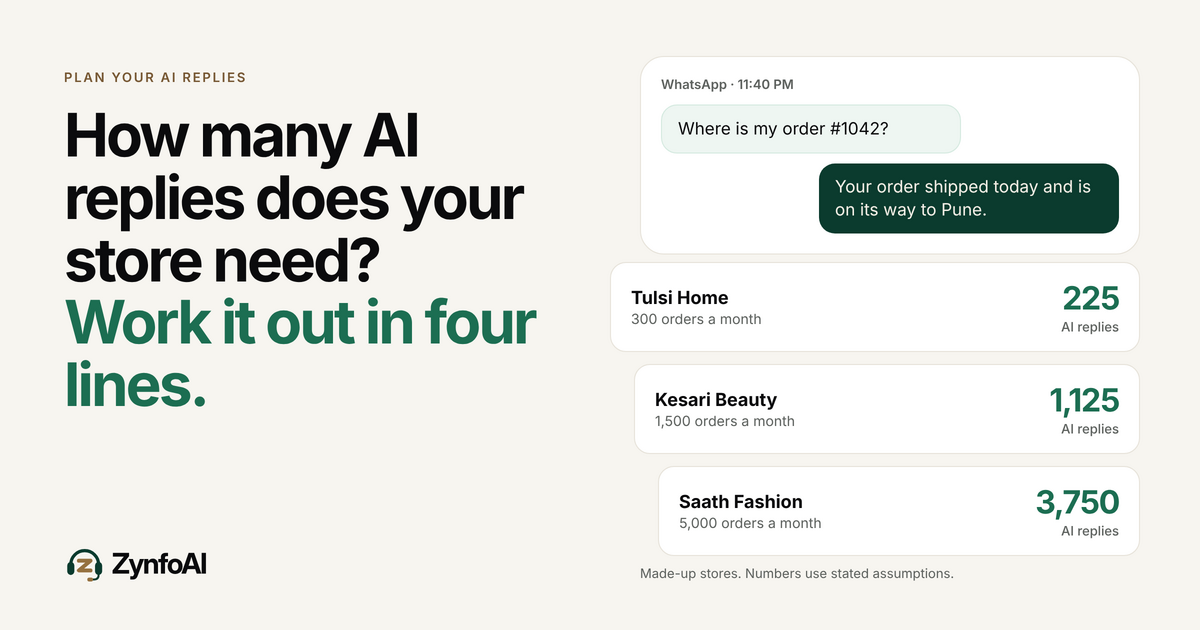
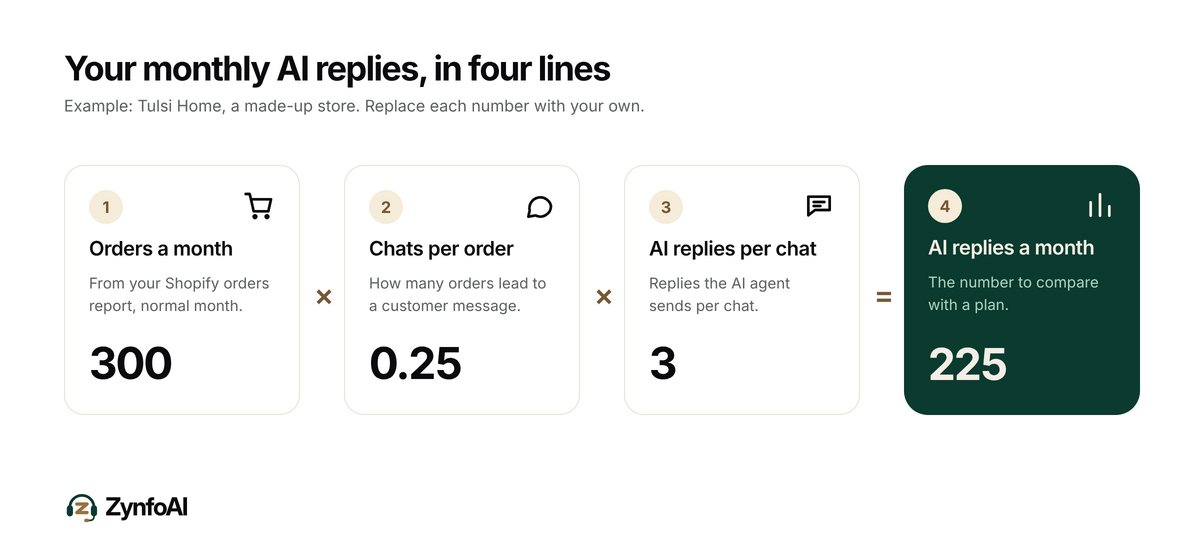
How many AI replies does a Shopify store need each month? Multiply your monthly orders by the share of orders that lead to a chat, then by the number of replies the AI agent sends in each chat. With the assumptions in this guide, a store with 300 orders a month lands near 225 replies and a store with 1,500 orders lands near 1,125.
ZynfoAI is an AI customer service agent for Shopify stores that answers customers on WhatsApp Business and website chat. It costs from $39 a month, with no per-resolution or per-seat fees, and a 7-day free trial with no card. That starting plan, Starter, includes 1,000 AI replies a month and 3 team seats.
This guide is for the owner of an Indian D2C store on Shopify who answers customers on WhatsApp and wants to pick a plan before Diwali, or for a store in the US, UK or Australia planning for Black Friday. It gives you a formula, three worked examples with made-up stores, a festive-week adjustment and a way to measure your real number during a free trial. Every volume in the examples is an assumption. Replace each one with your own.
What counts as an AI reply?
An AI reply is one answer the AI agent sends to a customer. A chat where a shopper asks “Where is my order?”, gets the status, then asks about the courier and gets an answer uses two AI replies. In this guide, a reply means one message the AI agent sends back, on WhatsApp or website chat.
Replies are not the same as chats, and they are not the same as resolutions. One chat can hold several replies. A reply you type yourself as a person is not an AI reply. Keep the three words apart when you compare tools, because some tools bill by resolution and others by reply, and the same chat can count differently under each.
ZynfoAI plans set a monthly allowance of AI replies. Starter, the plan most stores start on, has 1,000; the Pro plan is a larger plan with 5,000. Neither plan charges per resolution, and neither charges per seat. So the number you need to estimate is a single one: how many replies your AI agent will send in a month.
How many AI replies does a Shopify store need? The formula
Use three numbers: monthly orders, chats per order, and AI replies per chat. Multiply them. Then multiply by two for your busiest month if you run big sales. The result is the allowance you should compare against a plan, with some room left over for surprises.
Here is the formula in one line:
AI replies a month = orders a month × chats per order × AI replies per chat
Each number has an honest range:
- Orders a month. Take this from your Shopify orders report for a normal month, not your best one.
- Chats per order. This is how many orders lead to a customer message. For this guide we assume 0.25, meaning one order in four. Stores with slow couriers or cash on delivery questions often sit higher. Stores with a clear tracking page sit lower.
- AI replies per chat. We assume 3. A shopper asks, the AI agent answers, the shopper follows up once, and the AI agent answers again with a closing line.
None of these three numbers is a benchmark. They are starting points. The next section turns them into plans.
What does the formula give for three made-up stores?
It gives about 225 replies for a store with 300 orders, about 1,125 for 1,500 orders, and about 3,750 for 5,000 orders in a normal month. In a festive month at double the chat volume, the numbers become 450, 2,250 and 7,500. Which plan fits depends on the row.
All three stores are invented. Each uses the same two assumptions: 0.25 chats per order and 3 AI replies per chat.
| Made-up store | Orders a month | Chats a month | Replies, normal month | Replies, festive month (2×) | Plan that fits |
|---|---|---|---|---|---|
| Tulsi Home, Jaipur | 300 | 75 | 225 | 450 | Starter, with room to spare |
| Kesari Beauty, Pune | 1,500 | 375 | 1,125 | 2,250 | Pro. Starter runs out in a normal month |
| Saath Fashion, Surat | 5,000 | 1,250 | 3,750 | 7,500 | Pro in a normal month. A festive month is above 5,000 |
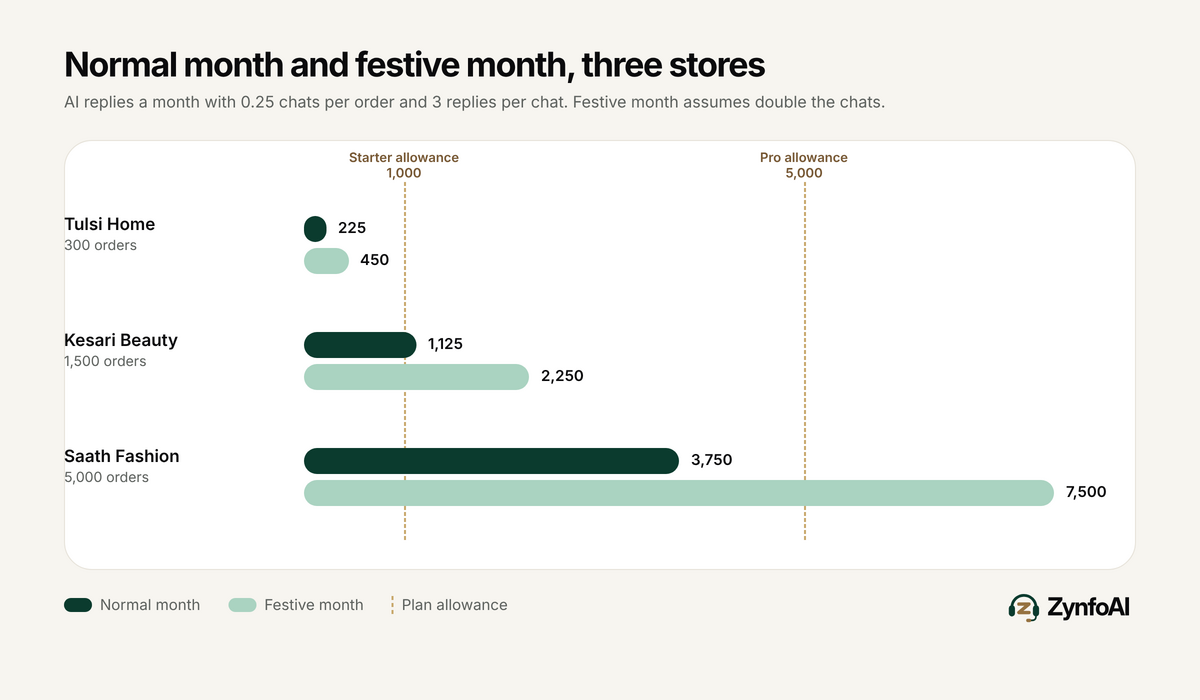
Read the last row carefully. A store at 5,000 orders a month fits inside Pro on an ordinary month, and passes Pro’s 5,000 replies in a festive month under these assumptions. That is a real limit. If your numbers look like Saath Fashion’s, do not assume any plan covers your peak. Measure first.
The first row is the common case for the buyers we write for. A store with 300 to 1,000 orders a month, one to three support people and a WhatsApp number usually fits Starter. Cross 1,000 orders a month under these assumptions and you are near the Starter limit before a sale begins.
Why do festive weeks use so many more replies?
Because buyers ask more questions and ask them at the same time. During a sale, order volume rises, couriers slow down, and shoppers ask “Where is my order?” within days. Doubling is a planning assumption, not a measured fact, so test it against your own last sale.
For Indian stores, 2026 gives a clear date to plan around. Lakshmi Puja, the main day of Diwali, falls on 8 November 2026, and the wider festival runs from 6 to 10 November (Wikipedia: Diwali). Sale orders land in the weeks before it, and the “where is my order?” messages land in the weeks after. Plan for both sides of the date, not only the day itself.
For stores that sell in the US, UK, Canada or Australia, Black Friday plays the same role in late November. The shape is the same: more orders in a few days, then a wave of delivery questions. Our posts on WhatsApp support during a Diwali sale and customer support for Black Friday go through the preparation in more detail.
A useful habit is to estimate two numbers, not one: a normal month and a sale month. Pick the plan that covers the normal month comfortably, then decide what you will do in the sale month. Some stores will accept a plan that fits the sale month and sits half-used in other months. Others will accept that the peak week needs extra attention from their own team.
What does each reply cost on a flat plan?
If you used every reply, Starter works out to $0.039 a reply ($39 divided by 1,000). That is arithmetic on the plan price, not a promise of savings. A plan you only half use costs more per reply actually sent.
Flat plans change the question. On a per-resolution tool, the bill rises with every chat the AI handles, so success costs more. On a flat plan the bill is fixed at the plan price, and the only limit is the allowance. The tagline we use for this is “Support that scales. Your bill doesn’t.” It holds until you reach the allowance, and that is why this guide exists.
To see the difference, take the three stores above and one competitor price. Fin’s pricing page lists “$0.99 per outcome”, with resolutions as one type of outcome, and a minimum of 50 outcomes a month when it is used with a non-Intercom helpdesk (Fin pricing, read 23 October 2026). A chat is not always an outcome, so treat the next numbers as a ceiling, not a quote: they assume every chat counts as one billed outcome.
| Made-up store | Chats a month | If every chat were billed at $0.99 | ZynfoAI plan |
|---|---|---|---|
| Tulsi Home | 75 | $74.25 | Starter, flat, no per-resolution fees |
| Kesari Beauty | 375 | $371.25 | Pro plan, flat, no per-resolution fees |
| Saath Fashion | 1,250 | $1,237.50 | Pro plan, flat, with the peak-month limit above |
The gap comes from how the two models count. The comparison also leaves out what each product does, and a store should compare features first and price second. Our longer guide on flat-rate versus resolution-fee pricing walks through the trade-offs, and the pricing page lists exactly what each plan includes.
How do you pick between Starter and Pro?
Pick Starter if your normal month needs fewer than about 800 AI replies and you do not need the Pro features. Pick Pro if you need more than that, or if you need a feature that is on the Pro plan. The reply count is the first test and the feature list is the second.
| Starter | Pro | |
|---|---|---|
| Price | From $39/month, no per-resolution fees | See the pricing page |
| AI replies a month | 1,000 | 5,000 |
| Team seats | 3 | 11 |
| Knowledge sources | 50 | 500 |
| Channels | Website chat and WhatsApp Business, with Shopify | Same, plus email support automation (on the Pro plan) |
| When the AI agent cannot answer | A help-desk ticket for your team | A help-desk ticket, plus live chat handoff to the team (on the Pro plan) |
| Order tracking and Shopify product search | Yes, for online stores | Yes, for online stores |
| Lead capture and help-desk tickets | Yes | Yes |
| WhatsApp broadcast campaigns | Not included | On the Pro plan |
| Abandoned cart recovery and CSAT | Not included | On the Pro plan |
| Per-resolution or per-seat fees | None | None |
Two notes on buying. In the ZynfoAI Shopify app, only Pro can be bought today. Starter is bought on zynfo.ai. WhatsApp message fees are billed by Meta on either plan, and they are separate from the reply allowance.
The 800-reply guide figure in the first sentence is a margin, not a rule. It leaves about a fifth of Starter’s allowance free for a bad week. If your normal month is closer to 1,000, move to Pro or watch usage closely.
How do you measure your real number before you pay?
Run the trial on real questions for a few days, then read the reply count and scale it to a month. The trial has every Pro feature on, no card is needed, and nothing is charged automatically. After it ends you move to the Free plan, with 100 AI replies a month, unless you pick a plan.
Follow these steps:
- Count last month’s orders. Use your Shopify orders report for a normal month.
- Count last month’s customer chats. Add WhatsApp conversations and website chats. A rough count is enough.
- Divide chats by orders. That is your real chats-per-order figure. Compare it with the 0.25 used here.
- Add your knowledge. Connect your website, shipping and returns pages and your Shopify catalog, so the AI agent has the answers.
- Send real questions. Paste 30 questions from last month’s chats into the AI agent, on both channels.
- Count replies per chat. Note how many replies each test chat used. That is your real replies-per-chat figure.
- Scale to a month. Put your real numbers into the formula, then double it for a sale month.
Your data is kept after the trial either way. Any question the AI agent could not answer is a help-desk ticket for your team, so the test also shows how many such tickets to expect. Our post on what happens when an AI agent can’t answer covers that side.
For the sums, the chatbot ROI calculator can help with the cost half, and the WhatsApp pricing calculator estimates Meta’s message fees.
How do you keep the number of AI replies down?
Remove the reasons customers ask. Put tracking where customers can find it, answer shipping and returns questions on a page, and make the order confirmation clear about delivery time. Each question that never gets asked saves replies, and each repeat question the AI agent can answer from one page saves a second one.
Three changes that cut chats per order:
- Send tracking in the first message. Many “where is my order?” chats start because the customer cannot find the link. Our guide on reducing “where is my order” tickets on Shopify lists the fixes.
- Publish your delivery and returns policy as plain pages. The AI agent learns from your site, so a clear page gives a short, correct reply.
- Cover the after-hours gap. Questions that arrive at night often come twice, once unanswered and once repeated in the morning. The post on WhatsApp support after office hours explains how an AI agent covers that window.
A lower reply count is a side effect, not the goal. The goal is that fewer customers wait for an answer.
How much of the bill is WhatsApp, and how much is the AI agent?
They are two separate bills. Meta charges for WhatsApp messages and ZynfoAI charges a flat plan price for the AI agent. Meta gives every business phone number a free tier of 1,000 service messages a month, and charges for template messages when they are delivered.
Meta’s pricing page says non-template messages can only be sent while the 24-hour customer service window is open, and that template messages can be sent at any time and are charged per delivered message (Meta pricing for the WhatsApp Business Platform). Because the AI agent mostly replies to customers who wrote first, most of its WhatsApp replies fall inside that window.
This matters for planning. A store that sends many promotional broadcasts will see a larger Meta bill than a store that only replies to customers. WhatsApp broadcast campaigns are on the Pro plan. Our guide to WhatsApp Business API pricing in 2026 breaks down Meta’s categories.
What should you do if you are close to the limit?
Treat 80 percent as the line. If your normal month uses more than about 80 percent of a plan’s allowance, move up a plan or reduce chats per order before a sale. A plan that you run out of in the middle of a festive week is the one decision you cannot undo that week.
A short checklist before you decide:
- I know my orders for a normal month and for my busiest month.
- I know my chats per order from last month’s actual chats.
- I measured replies per chat during the trial.
- My normal-month reply count is under 80 percent of the plan I picked.
- I have a plan for the peak week, whether that is a higher plan or extra attention from my team.
- I read the 15-day money-back guarantee on Starter and Pro, so I know what happens if I choose wrong.
For the wider question of how to choose, the guide to evaluating Shopify AI customer support covers criteria beyond reply counts, and the post on AI customer support software and support headcount looks at cost for larger stores.
FAQ
How many AI replies does a Shopify store need each month?
It depends on orders, chats per order and replies per chat. With 0.25 chats per order and 3 replies per chat, 300 orders need about 225 replies and 1,500 orders need about 1,125. Those are assumptions, so measure your own numbers in a free trial before choosing a plan.
How many AI replies are in ZynfoAI Starter and Pro?
ZynfoAI starts from $39 a month on Starter, which has 1,000 AI replies a month. The Pro plan has 5,000 AI replies a month. Neither plan charges per resolution or per seat; the pricing page lists both. WhatsApp message fees are billed by Meta.
What happens after the 7-day free trial?
The trial has every Pro feature on, needs no card, and charges nothing automatically. After it, your workspace moves to the Free plan, which has 100 AI replies a month, unless you choose a plan. Your data is kept. You can cancel anytime, and Starter and Pro have a 15-day money-back guarantee.
Does the AI agent count replies on both WhatsApp and website chat?
ZynfoAI is one AI agent for both channels, so its replies on WhatsApp Business and on website chat come from the same monthly allowance. When you estimate your number, add chats from both channels before you apply the formula.
Can I buy Starter in the Shopify app?
Not today. In the ZynfoAI Shopify app only Pro can be bought. Starter is bought on zynfo.ai. Both plans work with your Shopify store, and order tracking and Shopify product search apply to online stores.
Is an AI agent the same as a chatbot?
No. A scripted chatbot follows a fixed flow. An AI agent learns your own website and Shopify catalog, tracks orders, captures leads and turns questions it cannot answer into help-desk tickets for your team. People search for “chatbot”, so both words are used for this kind of tool.
Tools and guides
Put this into practice
AI Chatbot for E-commerce
Recover abandoned carts, automate order tracking, and boost online store sales.
Free ToolChatbot ROI Calculator
Calculate your projected cost savings, ticket deflection rate, and revenue impact.
Free ToolAI WhatsApp Reply Generator
Generate high-converting, professional WhatsApp sales and support replies with AI.
FeatureAI with Human Handoff
Escalate complex chats to live agents with complete conversation context.