AI Customer Support 12 min read
Best AI Support Software for WhatsApp and Web Chat
The best AI support software for WhatsApp and web chat depends on how you are billed and how many people answer customers. Seven tools below answer on both channels and pass the chat to a person. Wati and Respond.io are built around WhatsApp. Tidio and Crisp suit small teams. Chatwoot is open source. Fin charges per outcome. ZynfoAI is a flat $99 a month for a small team.
Last updated: 7 October 2026. Prices were read from each vendor’s own pricing page on this date and change often, so check the linked page before you buy.
This guide is for owners who answer customers themselves, with one or two helpers, mostly on WhatsApp and the website chat. You get a comparison table, a worked cost example for a small store, the questions to ask before you sign, and a checklist. ZynfoAI is our product, so it is one row in the table, with an honest “not for” line.
Which AI support software works with both WhatsApp and web chat?
Wati, Respond.io, Tidio, Crisp, Chatwoot, Fin and ZynfoAI all answer customers on a website chat and on WhatsApp. They differ in price model: per message, per seat, per workspace, per outcome or flat. They also differ in how they hand a chat to a person. Pick by price model first, then by handoff.
| Tool | Best for | Channels | Pricing model | Human handoff |
|---|---|---|---|---|
| ZynfoAI | Small teams that want flat pricing on website chat and WhatsApp | Website chat widget, WhatsApp Business API | $99 a month flat, 5,000 conversations and up to 11 seats included, no per-resolution fees | Hands the chat to a person in a shared team inbox |
| Wati | Businesses where WhatsApp is the main channel | WhatsApp Business API, web widget and social channels | Growth $25 a month on annual billing (3 users), Pro $99 a month (5 users, $24 per extra user), plus per-message charges | Shared team inbox, with a chatbot builder |
| Respond.io | WhatsApp-heavy sales and support teams | WhatsApp, web chat and social channels in one team inbox | Starter $79 a month (5 users), Growth $159, Advanced $279; WhatsApp fees are not included | AI agents escalate to people in the team inbox |
| Tidio | Small shops that want a low entry price | Live chat, WhatsApp, email and social channels | Starter $24.17 a month for 100 billable conversations, Growth $49.17 for up to 250 | Its Lyro AI agent hands off to a person |
| Crisp | Small teams that want an inbox with AI credits | Omnichannel inbox; WhatsApp on Essentials and Plus | Flat per workspace: Mini $45, Essentials $95, Plus $295; extra seats $10 a month | Shared inbox for the team |
| Chatwoot | Teams that want open source or self-hosting | Website live chat, WhatsApp, email and social channels | Per agent: free up to 2 agents, then $19, $39 or $99 a month; extra AI credits $20 per 1,000 | Its Captain AI agent hands off when a person should step in |
| Fin | Teams that want to pay only for resolved conversations | Web chat, WhatsApp and several other channels | $0.99 per outcome; helpdesk seats from $29 a month if you use their helpdesk | Transfers to agents in your inbox |
Each competitor row comes from that vendor’s own pricing or product page, linked in the table. Sources for the handoff column are Respond.io, Chatwoot and Fin’s pricing page.
How is AI support software priced for WhatsApp?
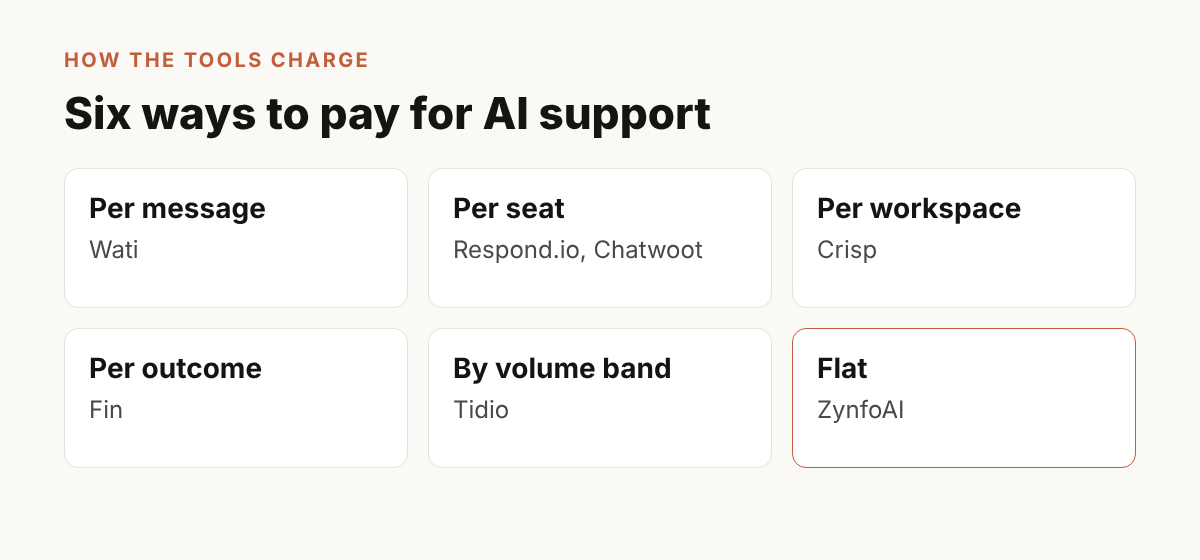
AI support software is priced in five ways: per message, per seat, per workspace, per resolved conversation, or flat. Your bill on WhatsApp also includes Meta’s own message charges, which most vendors pass on or bill separately. Ask for the all-in monthly number at your volume, not the headline plan price.
Here is how the seven tools in the table fit those models:
- Per message: Wati charges per message on top of the plan.
- Per seat: Respond.io includes 5 users on Starter and charges for extra users. Chatwoot charges per agent.
- Per workspace: Crisp prices the workspace, with seats included.
- Per outcome: Fin charges $0.99 each time an outcome is counted.
- Per conversation band: Tidio sells plans by billable conversations.
- Flat: ZynfoAI is $99 a month with 5,000 conversations and up to 11 seats.
For a longer look at per-resolution fees, read our flat rate versus per-resolution pricing breakdown.
What does Meta charge on top of the software?
Meta, which runs WhatsApp, charges per message on the WhatsApp Business Platform, and these charges are separate from the software plan. Meta’s own page says that from 1 October 2026 it also charges for service messages, which are free-form replies inside a customer’s chat window. Respond.io states plainly that WhatsApp fees are not included in its plans.
You can read the rule on Meta’s page on charging for service messages. For what the platform is, see Meta’s WhatsApp Business Platform overview and the Cloud API documentation.
Because Meta’s charges depend on country and message type, we do not quote a rate here. Our post on WhatsApp Business API pricing in 2026 walks through what changed, and the WhatsApp pricing calculator helps you estimate your own volume. Before you sign with any vendor, ask how Meta’s charges appear on the invoice.
What does each option cost a small store? A worked example
Take a Shopify store in Pune with 1,500 customer conversations a month and three people who sometimes answer. The questions are “where is my order?”, “do you ship to Dubai?” and “how do I return this?”. This is arithmetic from the list prices above, not a quote, and the tools bill different things, so read it as a feel for the pricing models.
| Option | How the maths works | Rough monthly software cost |
|---|---|---|
| ZynfoAI | $99 flat covers 5,000 conversations and up to 11 seats | $99 |
| Fin | $0.99 per outcome. If 1,000 of the 1,500 conversations count as outcomes, 1,000 × $0.99 | $990 |
| Chatwoot | 3 agents on the $19 plan, 3 × $19, before extra AI credits | $57 plus any extra AI credits |
| Respond.io | Starter plan with 5 users | $79, plus Meta’s WhatsApp fees |
| Wati | Pro plan with 5 users, plus per-message charges | $99 plus per-message charges |
Two lessons come out of this. First, pricing per outcome grows with your volume, so it is cheap when you are small and expensive when a busy month arrives. Second, a low plan price can hide the real costs: per-message fees, extra seats and AI credits. For a store with steady daily volume, a flat plan is easier to budget.
How do you choose AI support software for WhatsApp and web chat?
Choose by five questions: who answers after hours, how the bill grows with volume, how easily a person takes over, how fast it learns your own pages and catalog, and how long setup takes. Test it with your ten most common customer questions during the trial, not with the vendor’s demo script.
Use this as a numbered list when you compare tools:
- Write down your ten most common questions, such as order status, shipping areas and returns.
- Count your monthly conversations in your busiest month, not an average month.
- Ask each vendor for the all-in monthly price at that volume, including WhatsApp and seats.
- Start a free trial and train the agent on your own website pages and documents.
- Ask the ten questions on the website chat and on WhatsApp, and check the answers against your policies.
- Ask for a human by typing “can I talk to someone?” and see who receives the chat and how.
- Decide on the trial results, not the feature list.
How should AI hand a chat to a human on WhatsApp?
A good handoff passes the full conversation to a named person and stops the AI from replying while the person is typing. The customer should not have to repeat the question. Check three things: who gets the alert, whether your working hours are respected, and whether the AI pauses.
ZynfoAI hands the chat to your team in a shared inbox. The human handoff page shows how it works, and the team inbox page covers how people take over a chat. Whichever tool you choose, test the handoff yourself on WhatsApp, because it is the moment a customer decides whether to trust you.
Who is ZynfoAI for, and who is it not for?
ZynfoAI is for small teams that answer customers on a website chat and on WhatsApp and want one flat price. It learns from your website, documents and Shopify catalog, answers questions, tracks orders, captures leads and books demos. It is not for large enterprises that need a full ticketing suite.
The facts, in plain statements:
- ZynfoAI costs $99 a month flat, with no per-resolution fees.
- The plan includes 5,000 conversations a month and up to 11 team seats.
- It answers on a website chat widget and on WhatsApp Business through the official API.
- It learns from your website, documents and Shopify catalog.
- It hands a conversation to a human in a shared team inbox.
- There is a 7-day free trial with full access, and a 15-day money-back guarantee.
Read the pricing page for the full detail. The website chat widget and order tracking pages show what customers see. If you are comparing us with one of the tools above, we wrote head-to-head pages for Wati, Tidio and Crisp.
You should look elsewhere if:
- You need a full ticketing suite with many queues, service levels and reports for a large support department.
- You are a large enterprise with a long procurement process.
- You get only a few chats a week and answer them yourself. The free WhatsApp Business app may be enough.
- Your customers mostly reach you by phone or email rather than chat.
What is a good way to test an AI agent before paying?
Use the free trial with real questions. Train the agent on your own website, upload your return and shipping policy, and ask the questions your customers ask at night. Read every answer. Then ask for a human and check the handoff. A trial that only shows the vendor’s demo data tells you nothing.
For a Shopify store, run this test on day one: ask for the status of three real orders, ask whether you ship to a city you serve, and ask about your return window. If the answers match your policy, you have a candidate. If a tool cannot answer in your own words from your own pages, keep looking. For more on how an agent differs from a scripted bot, see our guide to WhatsApp AI agents and the post on one agent for website and WhatsApp.
Checklist: before you pick AI support software
- It answers on your website chat and on WhatsApp Business, not only one of them.
- You know the all-in monthly price at your busiest month’s volume.
- You know how Meta’s WhatsApp charges appear on the invoice.
- It learns from your own website, documents and catalog.
- A person can take over, and the AI stops replying while they do.
- You tested ten real questions during a free trial.
- You can cancel anytime and know the refund terms.
FAQ
Which AI customer support software works with WhatsApp and web chat?
Wati, Respond.io, Tidio, Crisp, Chatwoot, Fin and ZynfoAI all cover both channels. Crisp includes WhatsApp on its Essentials and Plus plans, not on lower plans. Check the plan you need, not only the product name, because channel access can depend on the tier.
Is there a flat-price AI support tool for a small team?
ZynfoAI costs $99 a month flat, with 5,000 conversations and up to 11 seats included and no per-resolution fees. Crisp also prices per workspace rather than per resolution. Fin charges $0.99 per outcome, and Wati adds per-message charges to its plans.
Does the software price include WhatsApp message fees?
Not always. Respond.io says WhatsApp fees are not included in any subscription, because Meta charges them based on usage. Wati bills per message. Ask every vendor how Meta’s charges appear on your bill before you start.
Can the AI hand a customer to a real person?
Yes, in all seven tools above. Respond.io, Chatwoot and Fin describe handoff to a person on their own sites, and Wati and Crisp give the team a shared inbox. ZynfoAI hands the chat to your team in a shared inbox. Test it yourself on WhatsApp during the trial.
How long does it take to try an AI agent on my store?
You can start a trial from the website, train the agent on your pages and documents, and ask your own questions the same day. ZynfoAI offers a 7-day free trial with full access, so you can judge it on real customer questions before paying.
Is ZynfoAI the right choice for a large enterprise?
No. ZynfoAI is built for small teams that want flat pricing on website chat and WhatsApp. A large enterprise that needs a full ticketing suite, with many queues and service levels, should look at a larger helpdesk platform. Start with the pricing page to see whether the plan fits your team.
Tools and guides
Put this into practice
AI WhatsApp Reply Generator
Generate high-converting, professional WhatsApp sales and support replies with AI.
SolutionWhatsApp AI Chatbot Platform
Automate customer support and sales over official WhatsApp Business API.
Free ToolWhatsApp Chat Widget Generator
Build a custom floating WhatsApp button to embed on WordPress or Shopify.
FeatureAI with Human Handoff
Escalate complex chats to live agents with complete conversation context.