WhatsApp Automation 4 min read
One AI Chatbot for Your Website and WhatsApp
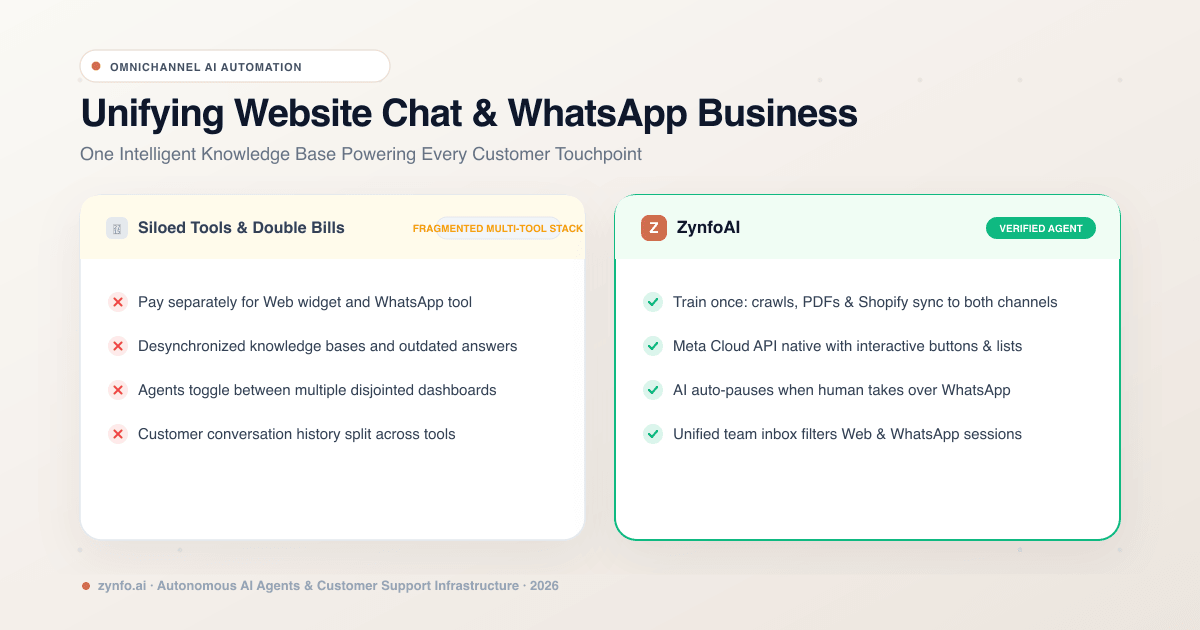
A shopper asks about sizing in your website chat at lunch. That evening they message your WhatsApp number: “Has my order shipped?” If those two channels run on different tools, they get answers from two different bots, and your team checks two inboxes.
You can run both from one AI agent instead. It learns from one set of content, answers on your website and on WhatsApp, and turns the questions it cannot answer on either channel into help-desk tickets for your team. This post shows how that works in ZynfoAI. For the WhatsApp side in detail, see our guide to the WhatsApp AI chatbot.
Two tools means two sets of answers
When the website bot and the WhatsApp bot are separate products, you train each one separately. Change your returns window from 14 to 30 days and you have to remember to update both. Miss one, and customers get different answers depending on where they asked.
Your team pays for it too: two logins, two inboxes, and no shared history when the same customer shows up on both.
How one agent covers both
One set of sources. Add your website pages, PDF, Word and Excel files, Google Drive documents and, for stores, your Shopify catalog, which is read live. When a page or document changes, resync it (or re-import the Google Doc) and both channels answer from the new version.
Website chat widget. One script tag adds a chat bubble to your site. Answers can show their source, and replies can include product cards and an in-chat form for lead details. More on the website chat widget.
WhatsApp Business. Connect your number through Meta’s Embedded Signup. The same agent answers there, with WhatsApp buttons and lists for the next step. Details are on the WhatsApp integration page.
One list of tickets. When the AI agent cannot answer on the website or on WhatsApp, the question becomes a help-desk ticket with the conversation attached, so your team works from one list.
What happens when a customer needs a person
When the AI agent cannot answer on either channel, it turns the question into a help-desk ticket with the full conversation, so your team picks it up without asking the customer to repeat themselves. Live chat handoff, where a teammate takes over the chat and the AI stops replying, is on the Pro plan. See human handoff for how it works.
An order question on both channels
For a Shopify store, here is how the same customer might be helped twice in a day.
On your website, at 1pm:
Shopper: Can you tell me where order #4892 is? AI: Order #4892 has shipped and is on its way to you.
On WhatsApp, at 8pm:
Customer: I want to return the jacket from #4892. AI: Our returns window is 30 days from delivery, so you’re within it. I’ve passed your question to the team as a ticket, and they will email you the next steps.
The order status comes from Shopify. The returns window comes from your own returns policy. Both channels use the same sources, so the answers match.
What to check before you switch
- Your WhatsApp number. ZynfoAI runs on Meta’s WhatsApp Business Platform rather than the WhatsApp Business app.
- Meta’s charges. They are billed by Meta, separately from your plan. Template messages you start are charged per delivery, and since 1 October 2026 replies inside the 24-hour customer service window are charged per message too. See our WhatsApp Business API pricing guide.
- Your plan. ZynfoAI costs from $39 a month, with no per-resolution fees and a 7-day free trial with no card. See pricing.
- Other channels. The AI answers on your website and WhatsApp. Email support automation is on the Pro plan. Instagram and Messenger aren’t covered.
If WhatsApp is the channel you’re adding, read the WhatsApp AI chatbot guide and see ZynfoAI for WhatsApp, then add the chat widget to your website.
Tools and guides
Put this into practice
AI WhatsApp Reply Generator
Generate high-converting, professional WhatsApp sales and support replies with AI.
SolutionWhatsApp AI Chatbot Platform
Automate customer support and sales over official WhatsApp Business API.
Free ToolWhatsApp Chat Widget Generator
Build a custom floating WhatsApp button to embed on WordPress or Shopify.
FeatureAI with Human Handoff
Escalate complex chats to live agents with complete conversation context.