WhatsApp Automation 13 min read
WhatsApp Chatbot With Human Agent Takeover
A WhatsApp chatbot with human agent takeover answers routine questions itself, then hands the chat to a person on your team, in the same WhatsApp thread, when the customer asks for one or the AI cannot answer. Good takeover means the AI stops replying while your teammate types, and the teammate sees everything said so far.
Last updated: 23 October 2026. Prices were read from each vendor’s own pricing page on this date and change often, so check the linked page before you buy.
This guide is for owners who answer customers themselves, or with one or two helpers, mostly on WhatsApp. You will see what takeover should do, a comparison of six platforms, the questions to ask before you pay, a worked example from a made-up Pune saree store, and a checklist. ZynfoAI is our product, so it is one row in the table, with an honest “not for” line.
What is a WhatsApp chatbot with human agent takeover?
A WhatsApp chatbot with human agent takeover is an AI agent that handles the first answer on WhatsApp and passes the live chat to a person when needed. The customer stays in one thread. The person sees the full history, and the AI pauses while the person handles it.
The word “chatbot” covers very different things. A scripted bot shows a menu and cannot step aside gracefully. An AI agent reads your own website, documents and catalog, answers in the customer’s words, and knows when to stop. If you want the long version of that difference, read AI agent vs chatbot. For the wider picture of running WhatsApp this way, see our guide to the WhatsApp AI agent.
Takeover has three parts, and a platform needs all three:
- A trigger. The customer asks for a person, the AI has no source for the answer, or the topic is on your list (refunds, damaged goods, a custom price).
- A shared inbox. Your teammate sees the whole conversation and claims it, so two people do not reply at once.
- A pause. While a person handles the chat, the AI does not send a second answer on top of theirs.
Which WhatsApp chatbot platforms support human takeover?
Wati, Respond.io, Tidio, AiSensy, Interakt and ZynfoAI all offer a WhatsApp channel with a team inbox. They differ in how they price it and in how clearly they describe takeover. Several pricing pages do not explain takeover at all, so ask each vendor to show it live.
| Tool | Best for | Channels | Pricing model | Human takeover |
|---|---|---|---|---|
| ZynfoAI | Small teams that want flat pricing on website chat and WhatsApp | Website chat widget, WhatsApp Business API | From $39/month, no per-resolution fees | Live chat handoff to your team on the Pro plan; on Starter, questions the AI cannot answer become help-desk tickets |
| Wati | Businesses where WhatsApp is the main channel | Growth includes 3 users; Pro includes 5 users, extra users $24 a month each; Business includes 5 users, extra users $69 a month each; automation triggers are capped each month | Team inbox on every plan; auto-routing on Pro; its pricing page does not describe bot-to-person takeover | |
| Respond.io | WhatsApp-heavy teams with several people | WhatsApp and other messaging channels | Starter $79 a month (5 users), Growth $159 (10 users, AI agents), shown for yearly billing; WhatsApp fees are not included | ”Team & Custom Inboxes” from Starter; its pricing page does not describe handoff |
| Tidio | Small shops that want a low entry price | Live chat, WhatsApp | Starter $24.17 a month for 100 billable conversations; Lyro AI agent from $32.50 a month for 50 AI conversations | Human handoff is listed as a Lyro AI agent feature |
| AiSensy | Indian businesses that want WhatsApp campaigns plus add-on bots | Unlimited Users plan; chatbot add-on ₹2,500 a month for 5 chatbots; AI agent add-on ₹1,350 a month with 1,000 AI messages | Live chat replies count as service messages; its pricing page does not describe takeover | |
| Interakt | Shops that want a shared WhatsApp inbox | Growth $55 a month, Advanced $69 (plus taxes); WhatsApp AI agents add-on $74.99 | Shared team inbox; Advanced adds chat auto-assignment; its pricing page does not explain how a person takes over from a bot |
Every competitor row comes from that vendor’s own pricing page, linked in the table, fetched on 15 October 2026. Where a page is silent, the table says so. We do not guess what a vendor does not publish.
How does human agent takeover work on WhatsApp?
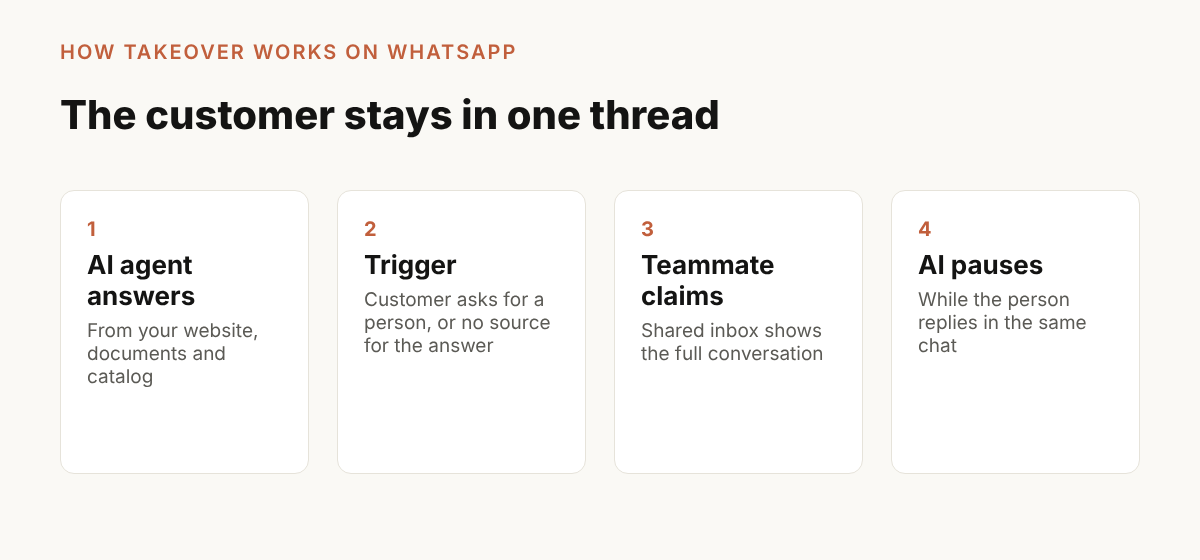
Takeover works in four steps: the AI answers, a trigger fires, a person claims the chat in the inbox, and the AI pauses while the person handles it. The customer never leaves the WhatsApp thread, and never has to repeat the question.
- The customer messages your WhatsApp Business number and the AI agent answers from your own pages and documents.
- The customer asks for a person, or the AI has no source for the answer, and the chat is flagged for your team.
- A teammate opens the shared inbox, reads the full conversation, and claims the chat.
- The AI stays quiet while the teammate replies. When the issue is solved, the teammate resolves the chat.
In ZynfoAI, live chat handoff to your team is on the Pro plan. On the Starter plan, a question the AI agent cannot answer becomes a help-desk ticket for your team instead of a live transfer. Our human handoff page shows how a handoff runs.
What is the 24-hour window, and why does takeover speed matter?
Meta’s WhatsApp rules let a business reply freely only inside a 24-hour customer service window. The window opens when the customer messages you and resets with each new customer message. After it closes, you can send only pre-approved template messages. So a slow takeover can cost you the chance to reply.
Meta’s developer documentation says it plainly: “When a WhatsApp user messages you or calls you, a 24-hour timer called a customer service window starts,” and “When the window closes, you can only send pre-approved template messages” (Meta, WhatsApp Cloud API: send messages, read 15 October 2026).
Meta also changes what it charges for. Its pricing page for non-template messages states that “Effective October 1, 2026, Meta will charge for service messages, which have not been charged since November 2024” (Meta, non-template message pricing, read 15 October 2026). That makes the cost of a long human-and-bot back-and-forth worth asking about. Check our WhatsApp rates by country and the post on WhatsApp Business API pricing in 2026 for the detail, and ask any vendor how Meta’s charges show up on your invoice.
For a plain overview of the official platform these tools sit on, see Meta’s Cloud API overview.
What should you ask a vendor about human agent takeover?
Ask six questions. Does the AI stop when a person joins? Can two teammates collide on one chat? What does the person see? What happens after hours? How does the vendor count a conversation once a person replies? And can you test all of it in a trial?
Here is what a good answer sounds like for each:
- Does the AI stop when a person joins? Yes, automatically. If the answer is “you switch the bot off for that contact by hand”, expect duplicate replies on busy evenings.
- Can two teammates collide? A good inbox lets one person claim a chat, and an unclaimed chat goes back to the queue.
- What does the person see? The whole conversation, the customer’s name and number, and previous chats. A summary is a bonus.
- What happens after hours? The customer should see an honest offline message, and the AI should still answer what it has a source for.
- How is a conversation counted? This matters for your bill. Tidio’s pricing page, for example, says a billable conversation is one with “a message from a human agent”, so the moment your teammate replies can change the count. Read the counting rule on any usage-based plan.
- Can you test it in a trial? You should be able to run a real takeover on your own number before you pay.
Our longer guide to when an AI chatbot should hand off to a human covers the rules you can write for your team.
A worked example: a made-up saree store in Pune
This is a made-up store to show the numbers, not a customer.
Meera runs a saree store in Pune from her phone, with one helper, Kavita. Customers message on WhatsApp all day: “Is this saree in stock in green?”, “Do you deliver to Nagpur?”, “What is the return window?”. At night the questions keep coming and nobody answers until morning.
She sets up an AI agent on her WhatsApp Business number. It learns her website, her return policy document and her product catalog. At 11:40 PM a customer asks about delivery to Nagpur and gets an answer from Meera’s shipping page. At 11:55 PM another customer writes that the border on her saree is torn and asks to speak to someone.
That second message is a takeover case. The AI does not argue with her. The chat is flagged for the team. In the morning Kavita opens the shared inbox, sees the full conversation, claims it, and replies in the same WhatsApp thread. The AI stays quiet while she handles it. She adds a private note for Meera about the replacement, and resolves the chat.
Here is the takeaway from the example. The routine question was closed overnight. The upset customer was not left with a bot. Nobody had to repeat anything. Meera’s trial test would be exactly this: send both kinds of message from a second phone and watch what happens.
Which tool is right for a small store?
If WhatsApp is your only channel and you want campaign broadcasts, a WhatsApp-first platform such as Wati, AiSensy or Interakt may fit. If you want a low entry price, Tidio starts low. If you need a bigger team inbox with several people, Respond.io is built for that. If you want one flat price for website chat and WhatsApp, with takeover on the Pro plan, ZynfoAI fits.
ZynfoAI is an AI customer service agent for Shopify stores that answers customers on WhatsApp Business and website chat. It costs from $39 a month, with no per-resolution or per-seat fees, and a 7-day free trial with no card. It learns from your website, documents and Shopify catalog, answers questions, tracks orders, captures leads, and turns the questions it cannot answer into help-desk tickets. Live chat handoff to a person is on the Pro plan, and the trial has every Pro feature on. There is a 15-day money-back guarantee.
Who is ZynfoAI not for? Large enterprises that need a full ticketing suite with many queues and service levels. If you only get a few chats a week and answer them yourself, the free WhatsApp Business app may be enough. Read the pricing page for the full detail, and our head-to-head pages for Wati and AiSensy if you are comparing.
For a wider comparison that includes web chat, see best AI support software for WhatsApp and web chat. To go step by step on replies, read automate WhatsApp replies with AI.
How do you test takeover before you pay?
Use the free trial with real messages. Train the AI agent on your own website and policy documents, then message it from a second phone. Run five tests: a routine question, a question it cannot know, a request for a person, a reply from your side, and a message after hours.
- Ask a question your policy page answers. Check the answer matches your page.
- Ask something the AI cannot know, such as a custom size. It should say it is not sure and flag the chat.
- Type “I want to talk to someone”. The chat should reach the inbox.
- Claim the chat on your laptop and reply. Confirm the AI does not reply on top of you.
- Message outside your working hours. Check the offline message is honest.
If a vendor will not let you run these on your own number, keep looking.
Checklist: before you pick a WhatsApp chatbot with human takeover
- It runs on the official WhatsApp Business API, on your own number.
- The AI pauses automatically while a person handles the chat.
- Your teammates share one inbox and can claim, transfer and add private notes.
- You can set working hours and an offline message.
- You know the all-in monthly price, including Meta’s own message charges.
- You know how the vendor counts a conversation once a person replies.
- It learns from your own website, documents and catalog.
- You ran the five tests above during a free trial.
- You know the cancellation and refund terms.
FAQ
What is human agent takeover on WhatsApp?
It is when a person on your team takes over a WhatsApp conversation from the AI. The customer stays in the same thread and the person sees the full history. The AI pauses while the person replies.
Can the customer ask for a person?
Yes. A good setup treats “talk to someone” as a trigger and moves the chat to your team straight away. It should also hand over when the AI has no source for the answer.
Does the AI keep replying after a person joins?
It should not. In ZynfoAI the AI pauses while a human handles the chat. With other tools, check whether the pause is automatic or manual.
What happens if nobody is online?
Set working hours and an offline message. The customer sees when to expect a reply, and the AI can still answer questions it has a source for.
Does takeover cost extra?
It depends on the vendor. Some count a conversation once a person replies, some charge for AI replies, and Meta charges for WhatsApp messages separately. ZynfoAI costs from $39/month with no per-resolution fees, and live chat handoff is on the Pro plan. WhatsApp message fees are billed by Meta.
How do I try it?
Start the 7-day free trial at zynfo.ai, train the agent on your site, and run the five tests above. See the pricing page for what the plan includes.
Tools and guides
Put this into practice
AI WhatsApp Reply Generator
Generate high-converting, professional WhatsApp sales and support replies with AI.
SolutionWhatsApp AI Chatbot Platform
Automate customer support and sales over official WhatsApp Business API.
Free ToolWhatsApp Chat Widget Generator
Build a custom floating WhatsApp button to embed on WordPress or Shopify.
FeatureAI with Human Handoff
Escalate complex chats to live agents with complete conversation context.